Tell us about your skin
Share your skin concerns, goals, sensitivity, present routine and product history.
 Ageless SkinMatchBY KWEM AGELESSCARE
Complete your guided skin assessment, upload three clear facial photos and receive an AI-assisted preliminary skin-type estimate. Emem, a licensed esthetician, reviews every completed submission before personalized routine or product guidance is provided.
Ageless SkinMatch combines your answers, current routine, safety information and facial photos so KWEM can guide you responsibly.
Share your skin concerns, goals, sensitivity, present routine and product history.
Disclose allergies, prescriptions, pregnancy, Accutane, recent procedures and active reactions.
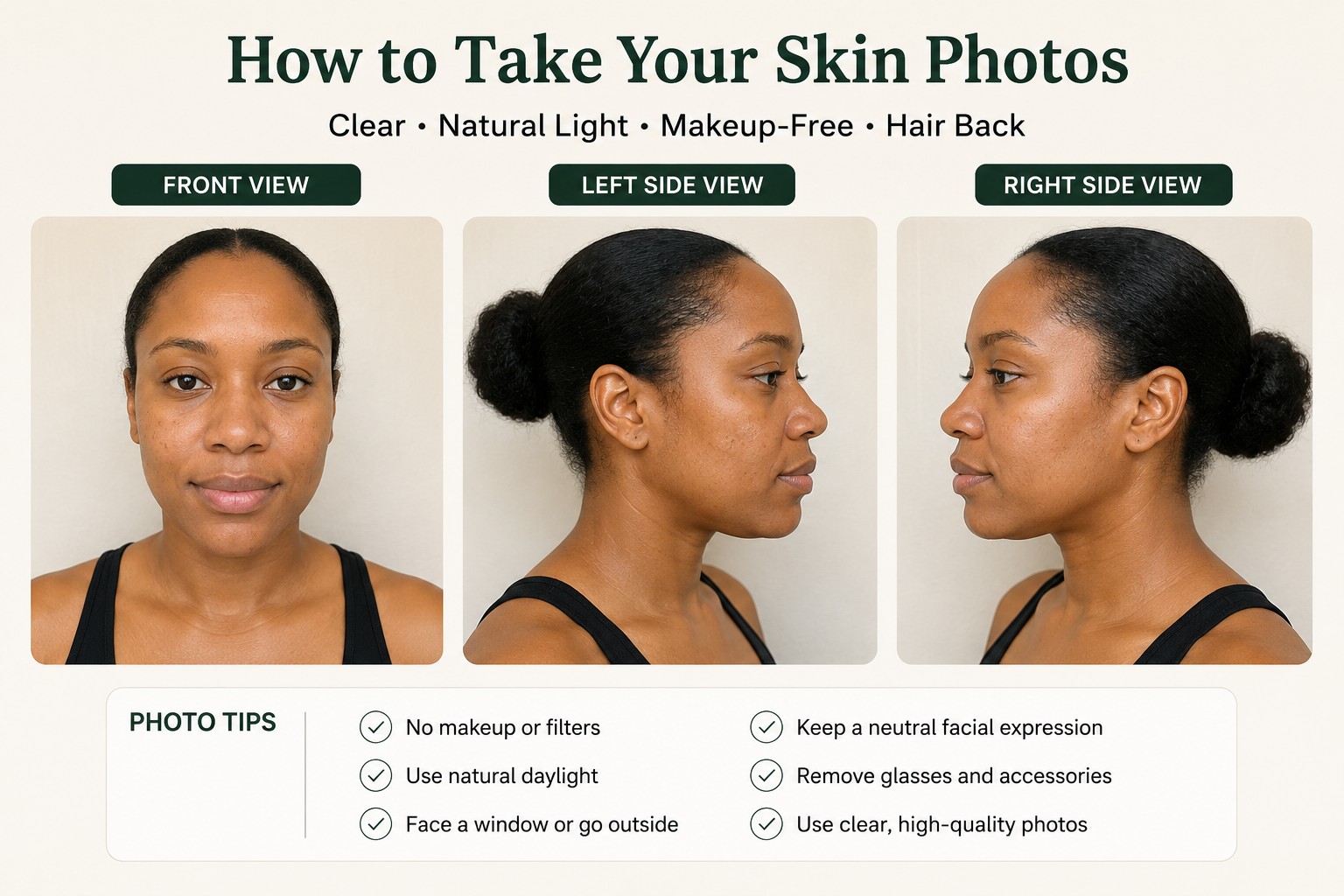
Capture front, left and right views for an educational preliminary skin-type estimate.
Emem reviews the complete submission before a routine or KWEM product match is approved.
Remove makeup and filters. Stand near a window in even natural light.
Upload front, left and right views while keeping your face relaxed.
See a preliminary estimate, then allow Emem, a licensed esthetician, to review your submission.
The quality of the result depends on clear, unedited photos. This scan estimates visible skin type only. It does not diagnose skin disease or prescribe treatment.
Tap each section and answer the guided questions. Your answers are saved on this device and carried into your complete SkinMatch assessment.
These answers remain on this device until you submit the complete SkinMatch form. Product and routine guidance is provided only after safety screening and professional review.
The AI may estimate dry, oily, combination or normal-looking skin from visible cosmetic features.
It will not diagnose acne, eczema, rosacea, infection, allergy or any medical condition, and it does not prescribe medication or treatment.
Emem reviews the client’s submission before any personalized esthetic skincare guidance is provided.
After the screening, Emem will review your submission within the professional scope of esthetic skincare. Medical concerns may be referred to a dermatologist or another qualified medical professional.
Your answers and submitted facial photographs are collected only to provide the requested virtual skincare assessment, professional review and follow-up. Do not upload identification documents or unrelated sensitive information. You may contact support to request access to or deletion of your submission, subject to legal and record-retention requirements.
Ageless SkinMatch provides general cosmetic-skincare screening and education. Artificial intelligence may assist with a preliminary visible skin-type estimate and organizing information, but it does not diagnose, prescribe, treat, cure or prevent disease. A licensed esthetician reviews completed submissions within the professional scope of esthetics.
Accurate recommendations depend on complete and truthful answers, clear current photographs and disclosure of products, prescriptions, allergies and recent procedures. Recommendations may be withheld when medical evaluation is more appropriate. Results vary and no particular outcome is guaranteed.
This service is not for emergencies. Seek appropriate medical assistance for severe swelling, breathing difficulty, open wounds, infection, sudden changes or a serious allergic reaction. Consultation rescheduling and cancellation are governed by the policy displayed when booking. Contact support@kwemvirtualskinmatch.com for help.